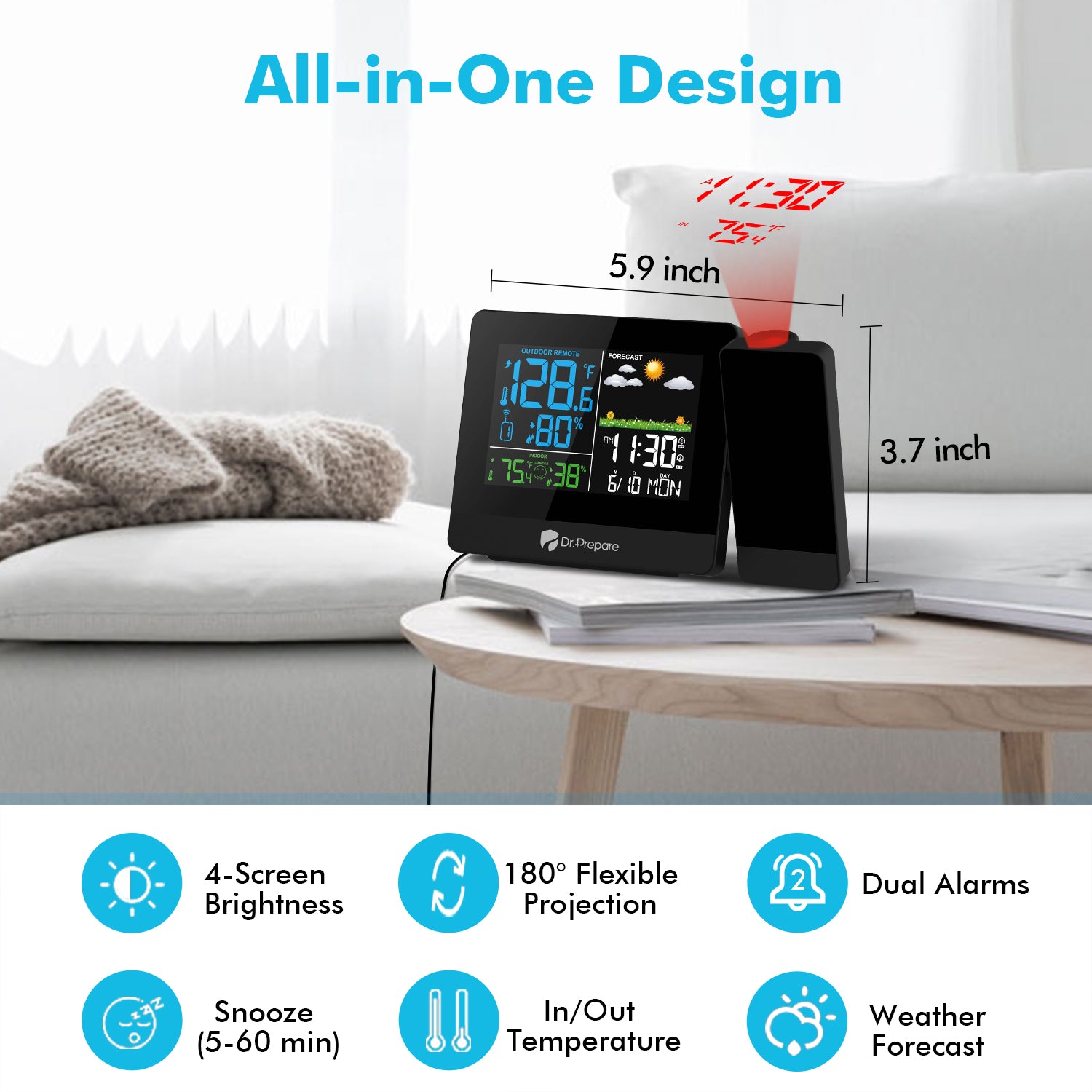
Dr. Prepare Projection Alarm Clock 3.0 combines the classic look adopted in the previous models with improved features to evoke your passion for each brand new day.
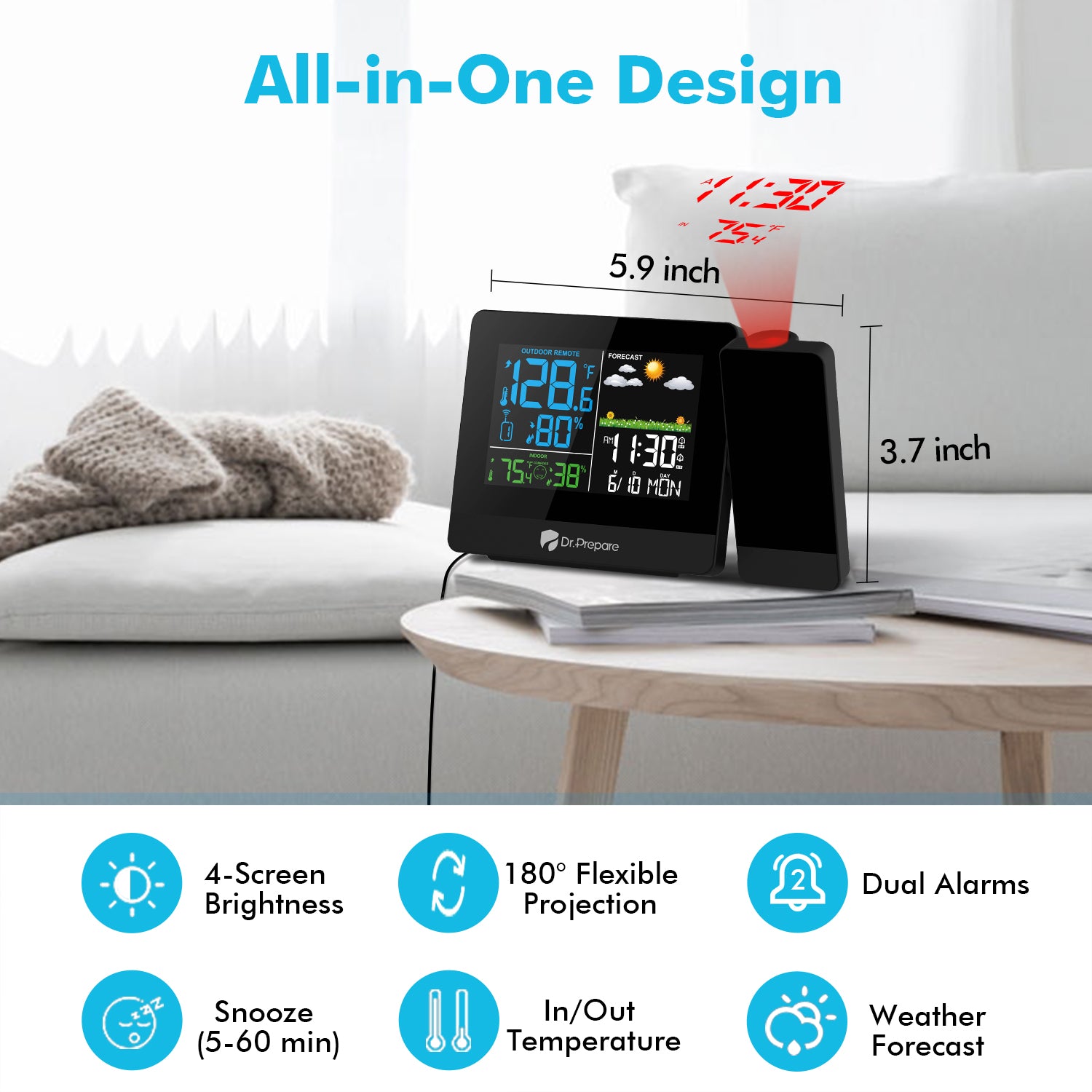
The crystal-clear screen comes with 4-levels adjustable backlight so you can tell time easily and comfortably at night. The 180-degree flexible projection now can stay lit all the time. Plus the dual alarms, temp display, weather forecast, and calendar, the new projection alarm clock will be the perfect match to your nightstand.
Key Features
【180° Projection & Adjustable Focus】Fits right in on your nightstand to project time and temperature onto the ceiling or wall. You can either swing the projector or flip the projection for 180° to easily tell the time and temp. The focus knob on the back allows you adjust projector focus to obtain clearer projected readings.
【Wireless Remote Sensor】Capable of connecting with wireless remote sensors, the projection clock registers outdoor temperature and humidity readings around your living area. Please follow the guidelines in the manual to learn how to connect the sensor with the clock and a few tips about its placement.
【Large LCD Screen & 4-Level Brightness】Comes with a large colorful backlit LCD screen, this projection alarm clock displays time, temperature, humidity clearly. 4 brightness settings (HIGH/MEDIUM/LOW/OFF) provide an optimal vision that suits you best for maximum comfort in different time or environment.
【Dual Alarms & Snooze】With separate switches on the back to control two alarms for different schedules and plans. The additional snooze function allows you to sleep for 5 minutes after the alarm rings, at a simple press of the SNZ/LIGHT button at the top.
【AC Adapter & Battery Backup】Plug the projection clock into a wall outlet with the included power adapter to keep the clock working and the display lit. Battery backup can keep the time settings. When the clock is only powered by batteries (requires 2 AAA batteries, not included), the screen will not stay lit and projection will shut off.
Key Features
180° Adjustable Projection
Adjust the projector's angle to and fro to project time and temperature onto the wall or ceiling.
Change Temp Units at One Press
Switch the units easily by pressing the 'inverted triangle' button.
Easily Connected Wireless Sensors
· 69 feet Max. transmission range in open areas (with a TX button to speed up connection). Channel selector (channel 1, 2, or 3)
· Wall-mount design. Splash-resistant casing (avoid direct sunlight or rain)
Note:
· Concrete walls, cellars, metal doors, or other signal sources may interfere with signal transmission.
· Should NOT be placed in direct sunlight, or else the temperature could go higher than the actual temp.
· Exceeding the maximum distance of 69 feet will result in unstable connection.
Flip to Read Conveniently
Press the ‘Rotate’ button to flip the projection for easy reading. Clock Placement: Make the clock face the wall so they projection won't be sideway.
4 Brightness Levels
Change the backlight brightness effortlessly by pressing the 'setting' button. The soft light offers maximum comfort to the eyes when reading time.
Backup Batteries
Batteries are only used to retain previous settings during outages. When using the batteries, the backlight and projection will shut off.
Easy to Read
It's convenient children to read time when studying and set wake up alarms in the morning.
Package Includes
1 x Dr. Prepare Projection Alarm Clock
1 x Wireless Remote Sensor
1 x Power Adapter
1 x User Manual
Specifications
Projection Alarm Clock 3.0
Display: colorful backlight
Optimal projection range: 3.3-10 feet
Time format: 12/24 Hour
Brightness levels of screen: Off / Low / Medium / High
Snooze duration: 5-60 minutes
Battery backup: 2 AAA batteries (not included)
Wireless Remote Sensor
Transmission range: 200 feet (in open areas)
Channel button: channel 1, 2, or 3
Notes
Projection
It takes turns displaying indoor/outdoor temperature every 5 seconds.
Wireless Sensor
We advise you not to push the channel button in the battery compartment of the wireless sensor. The default is channel 1.
Please make sure the clock does not rotate through each channel (a cycle icon will appear near the channel number) when you try to connect it with the sensor.
Place the sensor in a well-ventilated area for 36-48 hours to register readings that are relatively accurate.
Concrete walls, cellars, screens of electronic devices, metal doors, and other sources of signals will interfere with transmission.
Should NOT be placed in direct sunlight, or it will lead to a higher temperature reading.
Battery Backup
Backlight of the screen and projection will shut off when using batteries as a power source.
Please plug in the clock with the included AC adapter for full functions.
Download
Can the screen display lighting of this projection clock be turned off?
Press the SET button to switch the brightness of the screen from High >> Medium >> Low >> OFF.
How to flip the projection upside down?
In standard mode, press the Rotate / Projection button to flip projection for 180 degrees.
How to switch celceious to farienheight?
You can short press the "▼" button the switch the temparature units.
More questions about this product? Please contact us .
I lost my manual so contacted DrPrepare to help with some settings. They responded quickly, resolved my issue and attached a manual with the email. Great product.
A
Amanda
Awesome clock
It's better than what I expected. It's a perfect size and does not occupy so much space on my TV stand. Projection is very clear. I love it.
M
Mary
Great clock and wireless thermometer
Its projection is really good, with adjustable brightness. Gives inside & outside temp and humidity. Easy to set up and operate. Highly recommended.
D
Daley
Great value!
Ordered this for the humidity measurements. Everything works great. The buttons didn't take long to figure out after a quick skim-through of the manual.
B
Bonnie
Perfect clock
It's great to only slightly open your eyes, catch the time and outside temperature off the ceiling, and fall right back to sleep.